If you pay for every click, the page those clicks land on decides whether the money turns into calls and booked jobs or simply disappears. The short answer: a good Google Ads landing page for a service business repeats the promise the searcher just clicked on, shows proof that you can deliver it, makes calling or requesting a quote effortless on a phone, loads fast and tracks every lead back to the ad that produced it.
This guide walks through how to build that page section by section, what Google itself looks at, and a checklist you can use to audit the page you are sending traffic to today.
Key Takeaways
- Send ads to a dedicated page for one service and one offer, not your homepage.
- Match the headline to the search and the ad. Google describes landing page experience as how relevant and useful the page is to people who click your ad.
- Put the phone number and a short form above the fold on mobile, where most service searches happen.
- Use real proof: reviews, licenses, photos of your own work and a clear service area.
- Track form submissions and calls as conversions, or Google’s bidding is optimizing blind.
- Make sure the page works for Google’s crawler and matches your ad’s domain, or the ad can be disapproved.
Why the Landing Page Matters So Much in Google Ads
Google’s Quality Score is built from three components: expected clickthrough rate, ad relevance and landing page experience. Each is rated “Above average,” “Average” or “Below average” compared with other advertisers whose ads showed for the same searches. Google’s help center defines landing page experience as “how relevant and useful your landing page is to people who click your ad.”
Those quality signals feed into how your ads compete in the auction, so a weak page can cost you twice: fewer leads from the clicks you already bought, and a harder time winning good positions at a reasonable price.
The economics are easy to see. WordStream’s 2025 Google Ads benchmarks, based on more than 16,000 US advertisers, reported an all-industry average conversion rate of roughly 7.5% and an average cost per lead of around $70, with wide swings by industry. Think of those as rough reference points rather than targets, but the math holds for any account: if your page converts at 4% instead of 8%, every lead costs you about twice as much, even with identical ads and bids.
Homepage vs Dedicated Landing Page
| Question |
Your homepage |
A dedicated landing page |
| Does the headline match the search? |
Usually generic (“Welcome to ABC Services”) |
Written for one service, such as “Same-Day Water Heater Repair in Tampa” |
| How many choices does a visitor have? |
Full menu, blog, about page and many exits |
One main action: call or request a quote |
| Can you test changes safely? |
Changes affect every visitor |
Test headlines and offers without touching the main site |
| Can you measure it cleanly? |
Mixed traffic from every channel |
Paid traffic only, so results are easy to read |
For most service businesses, one landing page per core service (for example, drain cleaning, water heaters and sewer repair for a plumber) is a sensible starting point. Group your ad keywords the same way, so each ad group points to the page that answers it best.
The Anatomy of a High-Converting Service Landing Page
Work from top to bottom. Each section should answer the next question a hesitant visitor is likely to have.
1. A headline that mirrors the search
If someone searched “emergency roof leak repair” and your ad promised fast leak repairs, the page headline should say the same thing in plain words, ideally with your city or service area. A short subheadline adds the main reason to choose you, such as licensed technicians, upfront pricing or a response time you can actually deliver.
2. The primary action, visible without scrolling
On a phone, the first screen should show a tap-to-call button and a clear button or short form for a quote. Don’t make people hunt for your number. A sticky call bar at the bottom of the mobile screen works well for urgent services.
3. A short form
Ask only for what you need to call back: name, phone, ZIP code and a one-line description of the job. Every extra field gives people another reason to leave. If you need more detail, collect it on the follow-up call or on an optional second step after the main details are submitted.
4. Proof you are real and reliable
- Genuine reviews (with permission) and your Google rating, if you show it accurately.
- License, insurance and bonding details where they apply to your trade.
- Photos of your own team, trucks and finished work rather than stock images.
- Warranties or guarantees you really offer, written clearly.
5. What happens next
A simple three-step “how it works” block (request, quick call back, scheduled visit) reduces anxiety, especially for first-time customers who don’t know how quotes or visits work.
6. Service area and hours
State the cities or counties you cover and when you answer the phone. This also filters out leads you can’t serve, which saves ad spend.
7. Short FAQ and a final call to action
Answer the three or four questions your office hears most, such as pricing ranges, timing and whether there’s a call-out fee, then repeat the call and form buttons at the bottom.
Speed, Mobile and Technical Basics
A beautiful page that loads slowly on a 4G connection loses visitors before they see your offer. Practical targets:
- Core Web Vitals: Google’s “good” thresholds are Largest Contentful Paint within 2.5 seconds, Interaction to Next Paint under 200 milliseconds and Cumulative Layout Shift below 0.1. Check your page in PageSpeed Insights.
- Light pages: compress images, avoid heavy sliders and auto-playing video, and limit third-party scripts and chat widgets.
- Readable on small screens: large tap targets, at least 16px body text and no pop-ups that cover the content when the page opens.
- Secure and stable: HTTPS, no broken links and no form errors on common browsers.
Stay Within Google Ads Destination Policies
Google’s destination requirements are about making sure people land where the ad says they will, on a page that works. The most common problems for small businesses:
- Destination not working: the page errors, breaks on common browsers or devices, or returns errors to Google’s crawler. A security plugin or firewall that blocks Google’s AdsBot can trigger this, so test your page after any security change.
- Destination mismatch: the display URL’s domain doesn’t match where people end up, or a redirect or tracking template sends them to a different domain or content.
- Misleading content: promises the page can’t back up, like a price or “free” offer with hidden conditions. Beyond policy risk, it attracts leads who won’t buy.
Google says it issues a warning at least seven days before suspending an account for repeated policy violations, but it’s far better to fix issues before an ad is disapproved.
Track Every Lead or You Can’t Improve
Smart Bidding learns from the conversions you report. If your account only counts page views, or counts nothing at all, Google can’t tell a good click from a wasted one.
- Form submissions: count the thank-you page or a successful-submit event as a conversion, not the button click.
- Calls: track calls from ads and clicks on your phone number from the landing page.
- Enhanced conversions for leads: lets Google match leads using hashed first-party data, like the email or phone number from your form, so you can later report which leads became paying customers. Google recommends collecting both email and phone to improve match rates.
- Consistent setup: keep tags in one place, such as Google Tag Manager, and test each conversion after every website update.
Once tracking is in place, test one change at a time, such as the headline, the offer or the form length, and give each test enough traffic before deciding.
Landing Page Audit Checklist
Score your current page with this list. Each “no” is a likely leak.
- The headline names the service the ad promised.
- The city or service area is visible on the first screen.
- A tap-to-call button is visible on mobile without scrolling.
- The form has five fields or fewer.
- The page has real reviews, photos and license details.
- There is one main action, and the full site menu is removed or minimal.
- The page passes Core Web Vitals on mobile.
- The display URL domain matches the landing page domain.
- Form submissions and calls are tracked as conversions and tested.
- Every claim, price and offer on the page is accurate and current.
Common Mistakes That Waste Ad Spend
- Sending every ad to the homepage.
- One generic page for every service and every city.
- Long forms that ask for a budget, address and project details upfront.
- A phone number in small print, or as an image people can’t tap.
- No tracking, so budget decisions are based on guesses.
- Changing the page, ads and bids all at once, so nobody knows what worked.
Frequently Asked Questions
Can I use my homepage as a Google Ads landing page?
You can, and the ad will still run, but a dedicated page that matches the search and has one clear action usually gives you a better chance at converting visitors. It’s also easier to test and measure.
How many landing pages do I need?
Start with one page per main service you advertise. Add separate pages only when a different audience or offer genuinely needs different content, not just to swap in another city name.
Should my landing page include navigation?
Keep it minimal. A logo, phone number and perhaps a link to reviews are enough. Every extra link is a way out of the page before the visitor contacts you.
How long should a service landing page be?
Long enough to answer the questions that stop people from calling. Urgent services can be short, while higher-priced projects like remodeling usually need more proof, process detail and FAQs.
Does the landing page affect my cost per click?
It can. Landing page experience is part of Quality Score, and those quality signals influence ad auctions. A better page also lowers your cost per lead by converting more of the clicks you already pay for.
Get a Landing Page That Pays for Its Clicks
Blue IT builds dedicated campaign pages with clear conversion paths, proof sections, mobile-responsive layouts and tracking-ready setup (GA4, GTM and pixels), with A/B test variants when you’re ready to experiment. Explore our
landing page design services, see how our team runs Search, Remarketing and Local Services Ads campaigns on the
Google Ads management page, or look at the
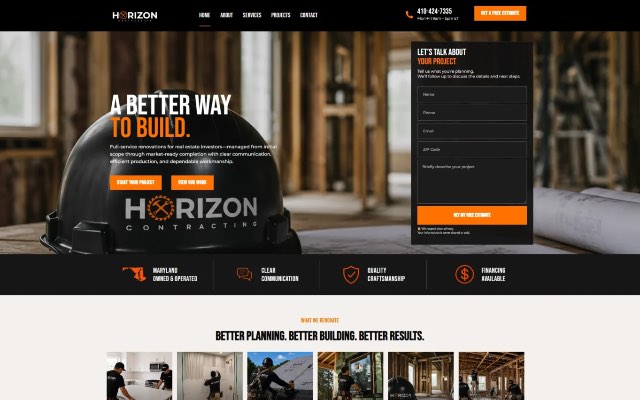
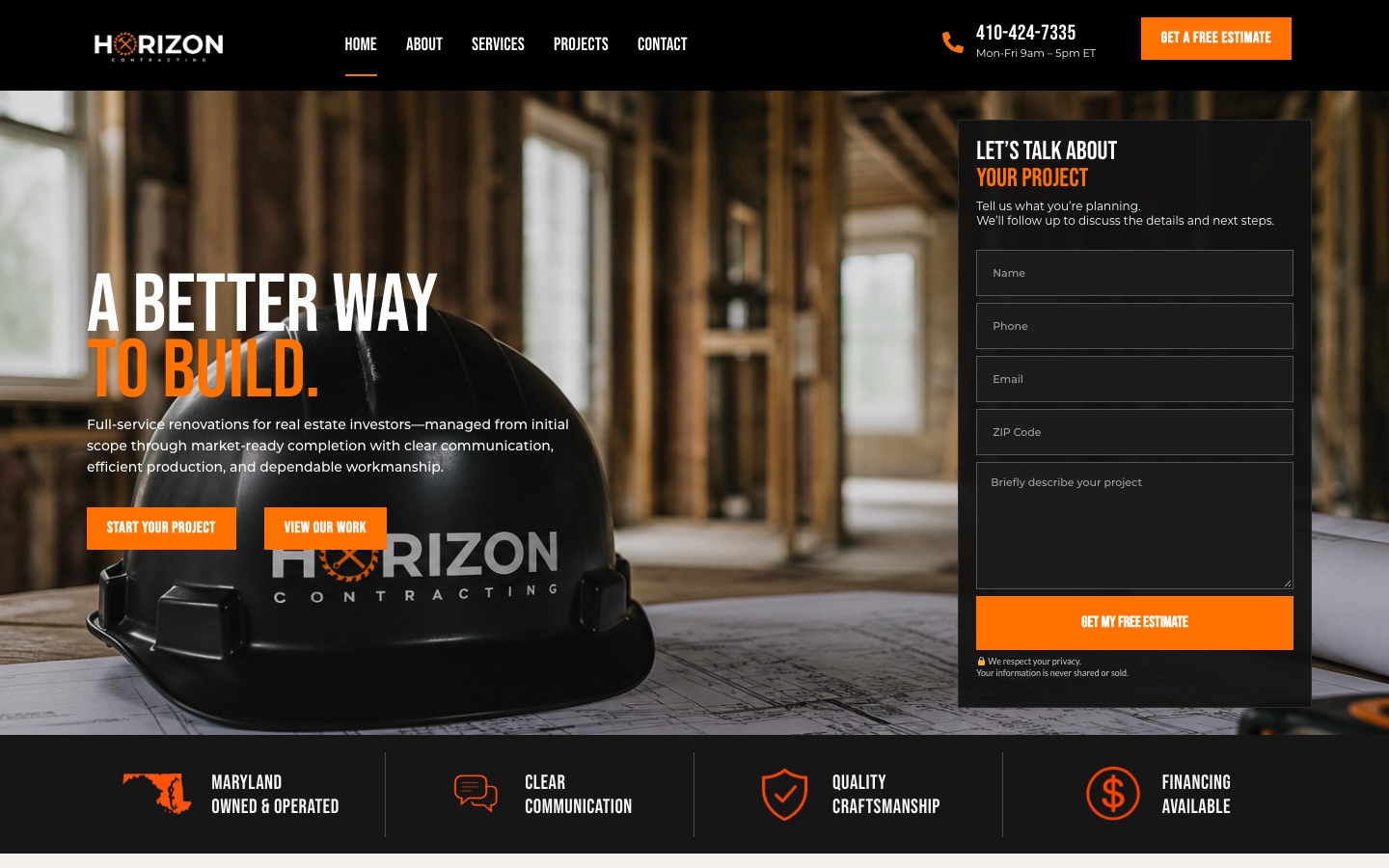
Horizon Contracting case study for a contractor site built around a free-estimate form. If you’re weighing a full rebuild instead, our
WordPress website cost guide explains the budget, and our
construction company website guide covers the pages contractors need. Ready to talk?
Book a free consultation.