If you run a construction or home-service company in the US, your website has one job: turn people who are comparing contractors into people who call you for a quote. A good construction website does not need to be expensive or complicated, but it does need the right pages, real project photos, clear trust signals and a fast, simple way to ask for an estimate.
This guide covers what a construction company website costs in 2026, which pages and features actually win jobs, the local SEO basics that help you show up in your service area, and the mistakes we see most often when contractors ask us to rebuild their sites.
Key Takeaways
- Most published 2026 estimates put a custom construction website between roughly $2,000 and $10,000, with large agency builds going higher. Simple template sites can cost far less.
- The price is driven mainly by the number of service and service-area pages, the size of your project gallery, and integrations such as quote forms, CRMs and scheduling.
- The pages that matter most are: one page per service, service-area pages, a project gallery with real photos, reviews, and a short quote form.
- Local SEO starts with a complete Google Business Profile, consistent business details everywhere, and service pages written for the towns you actually work in.
- Speed and mobile usability are not optional: most homeowners will look at your site on a phone, often while standing in the room they want renovated.
How Much Does a Construction Company Website Cost in 2026?
There is no single price, because “a website” can mean a one-page template or a 40-page site with a project database and a CRM connection. Here is how the main options usually compare:
| Option |
Typical upfront cost |
Best for |
Watch out for |
| DIY website builder |
A few hundred dollars per year |
Brand-new businesses testing the market |
Generic templates, your time, limited SEO control |
| Freelancer |
About $2,000 – $9,000 |
Small contractors with a clear scope |
Availability, support after launch |
| Agency / studio |
About $5,000 – $20,000+ |
Growing firms that need strategy, content and marketing |
Long timelines, paying for features you don’t need |
These ranges reflect what most published 2026 cost guides report for US contractor websites. Treat them as a starting point and ask every provider for an itemized quote, so you are comparing the same scope.
For reference, our own
WordPress website packages start at $399 for a site of up to 5 pages and $699 for up to 10 pages with a blog, advanced SEO and speed optimization. Larger builds with eCommerce or custom features are quoted after a free consultation.
What drives the price up (or down)
- Number of pages. Every service you offer and every city you want to rank in deserves its own page. Ten services across five towns adds up quickly.
- Project gallery. A simple photo grid is cheap. A filterable portfolio with project pages, before/after sliders and categories takes more work.
- Content and photos. If you provide the text and real job-site photos, you save money. Professional copywriting and photography add cost, but they also make the biggest difference to results.
- Integrations. Quote forms that feed a CRM, online scheduling, financing calculators or a customer portal all add development time.
- Design approach. A customized theme costs less than a fully custom design built from scratch.
Ongoing costs to budget for
- Domain name: usually $10 – $20 per year.
- Hosting: from a few dollars a month for shared hosting to $30+ a month for managed WordPress hosting.
- Maintenance: updates, backups, security monitoring and small edits. You can do this yourself or use a WordPress maintenance plan.
- Marketing: local SEO, Google Ads or Local Services Ads if you want leads faster than organic search alone can deliver.
The Pages Every Construction Website Needs
1. A homepage that answers three questions in five seconds
What do you build, where do you work, and how does someone get a quote? Put your main service, your service area and a “Get a Free Estimate” button above the fold. Add a phone number that can be tapped on mobile.
2. One page per service
“Kitchen remodeling”, “roof replacement” and “commercial build-outs” are different searches made by different customers. A single “Services” page listing everything rarely ranks for any of them. Give each core service its own page with a description of the process, typical timelines, photos of that type of work and a quote button.
3. Service-area pages
If you work across several towns or counties, create a page for each important area. Each one should be genuinely useful: projects you have completed there, local permit notes, neighborhoods you serve and reviews from customers in that area. Copying the same text and swapping the city name does not work and can hurt you.
4. A project gallery with real work
Homeowners and property managers want proof. Show real photos of finished jobs, grouped by service, with a short caption: what the client needed, what you did and how long it took. Stock photos of smiling workers in clean hard hats do the opposite of building trust.
5. About and credentials
Show the people behind the company, how long you have been in business, and your license and insurance details where they apply. These details often decide between two contractors with similar prices.
6. Reviews and testimonials
Feature reviews from Google and other platforms, with names and project types. Link to your Google Business Profile so visitors can read more.
7. A short quote request form
Ask only for what you need to call back: name, phone, email, project type, zip code and a short description. Every extra field costs you leads. Offer a photo upload if photos help you estimate.
Features That Turn Visitors Into Quote Requests
- Click-to-call and click-to-text buttons that stay visible on mobile.
- A clear next step on every page, not just the contact page.
- Trust signals near the form: years in business, license number, insurance, warranties and review ratings.
- Response-time promise, for example “We reply within one business day”, and then keep it.
- Financing information if you offer it, since larger projects often depend on it.
- Fast loading pages. Compress your project photos and avoid heavy sliders on the homepage.
- Lead tracking so you know which pages and campaigns produce calls and form submissions.
Local SEO Basics for Contractors
Most construction customers search with a location in mind, such as “deck builder near me” or “general contractor in Austin”. These steps help you appear in those results:
- Complete your Google Business Profile. Choose accurate categories, add your service areas, hours, real photos and a link to your website. Keep posting project photos.
- Keep your business details consistent. Your business name, address and phone number should match exactly on your website, Google, Yelp, Angi, BBB and industry directories.
- Build service and service-area pages as described above, and link them to each other.
- Ask every happy customer for a review. Send a direct link after the job is finished and reply to every review, good or bad.
- Add structured data. LocalBusiness or GeneralContractor schema helps search engines understand who you are and where you work.
- Make the site fast and mobile-friendly. Page experience is part of how Google evaluates sites, and it directly affects whether visitors stay.
If you would rather have this handled for you, our
local SEO services cover service-area strategy, location pages, citation cleanup and NAP consistency, local technical SEO and monthly reporting.
Common Mistakes on Contractor Websites
- No prices, no process, no timelines. You don’t need exact prices, but explaining how estimates work and what affects cost builds confidence.
- Stock photography everywhere. Your real work is your best sales tool.
- One page for all services. It is hard to rank for anything this way.
- Long, complicated forms that ask for budget, timeline, address and project details before anyone has talked to you.
- A phone number in an image or hidden in the footer, so it can’t be tapped on mobile.
- No follow-up after launch. A website that is never updated with new projects slowly loses its edge.
WordPress or a Website Builder?
Website builders are quick to start with and fine for a very small business. WordPress gives you more control as you grow: unlimited service and location pages, a flexible project gallery, full SEO control and thousands of integrations, without monthly per-feature fees. For most contractors who want to rank locally and add pages over time, a well-built WordPress site is the more flexible long-term option. You can compare the platforms in more detail in our article on
Webflow vs WordPress.
Questions to Ask Before You Hire a Web Designer
- Can I see websites you have built for contractors or home-service businesses?
- Who writes the content, and who provides the photos?
- Will I own the website, the domain and the hosting account?
- Is basic on-page SEO included, and what does it cover?
- What happens after launch: support, updates, and edits?
- How will I know how many leads the website produces?
Construction and Home-Service Websites We’ve Designed
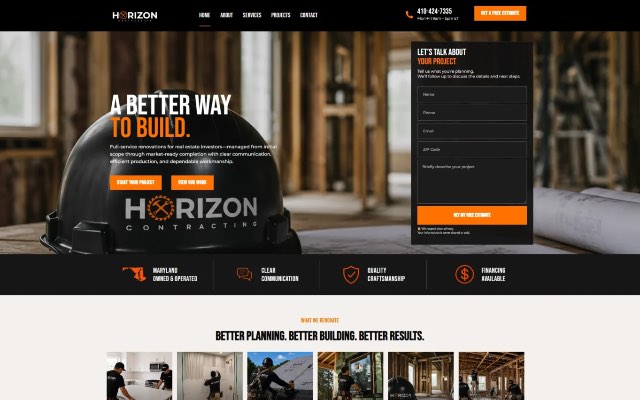
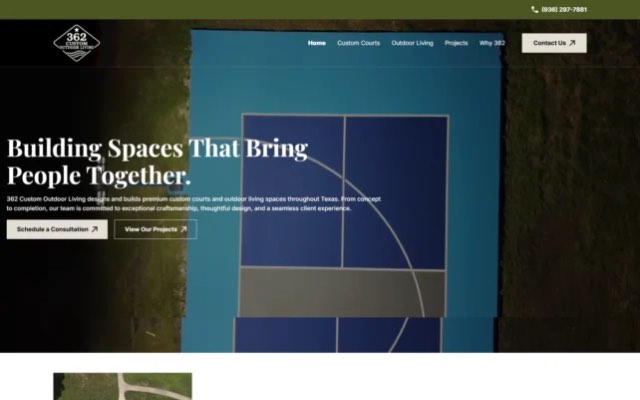
Our team has designed websites for construction and home-service businesses including Horizon Contracting, Simply Honest Flooring, 362 Custom Outdoor Living, Faizi Homes Flooring, Superior Trades, Nexus Climate Control and Canaima Electric. You can see these and other projects in our
portfolio.
Frequently Asked Questions
How long does it take to build a construction company website?
A small site with up to five pages can be delivered in one to two weeks once the content is ready. Our Starter builds take 5–7 business days and our Growth builds 10–12 business days. Larger sites with many service-area pages or custom features take longer.
Should a contractor show prices on the website?
Exact prices are rarely possible, but typical ranges, starting prices or an explanation of what affects cost help visitors decide to contact you, and they filter out people whose budget doesn’t fit.
Do contractors need a blog?
A blog is not required, but useful articles that answer real customer questions (for example permit requirements, material comparisons or project timelines) can bring in local search traffic and show your expertise.
How many service-area pages should I create?
Start with the towns where you already do the most work and want more jobs. A handful of detailed, genuinely useful pages beats dozens of thin copies.
Can I update the website myself?
Yes. A WordPress site can be set up so you can add new projects, photos and reviews without touching code.
Ready for a Website That Brings in Estimates?
If your current website isn’t producing calls and quote requests, or you don’t have one yet, we can help.
Book a free consultation and we’ll review your current site, your local competitors and the pages you need to start winning more jobs online.