An HVAC website has to work for three very different visitors: the homeowner whose AC quit at 9 p.m. in July, the family comparing quotes for a new system, and the customer who just wants a tune-up before winter. The sites that book the most jobs make each of those visitors’ next step obvious within a few seconds, usually a tap-to-call button, a short booking or estimate form, and clear proof that you are licensed, local and trustworthy.
This guide walks through those three visitors, the pages and features that serve them, and the claims HVAC companies need to keep accurate in 2026, because rebate, refrigerant and financing details have changed more than most contractor websites reflect.
Key Takeaways
- Design around three jobs: emergency repair, system replacement and maintenance. Each needs a different call to action.
- Put your phone number, service area and hours where a stressed visitor on a phone sees them without scrolling.
- Give every core service and every main service area its own useful page; these are the pages people find on Google.
- Show license numbers, insurance, real technician photos and reviews. They do the selling before you pick up the phone.
- Audit your rebate, tax credit, refrigerant and financing wording. Several common claims from 2023–2025 are now outdated or need disclosures.
Design for Three Visitors, Not One
Most HVAC sites treat every visitor the same: a big hero image, a generic “Contact Us” button and a list of services. But the person with no heat and the person planning a replacement next spring want different things, at different speeds.
| Visitor |
What they need to see first |
Best call to action |
| Emergency repair (no heat, no cooling, leak) |
Do you serve my area, are you open now, how fast can you come |
Tap-to-call button, with a short “request service” form as backup |
| System replacement |
Brands and system types you install, how quotes work, financing, warranties, reviews |
“Request a free in-home estimate” form (if you offer free estimates) |
| Maintenance and tune-ups |
What a tune-up includes, maintenance plan benefits, price or starting price |
Online booking or “schedule a tune-up” form |
A simple way to apply this: keep the phone number and an “Emergency service” link in the header on every page, then let the homepage hero point to the other two paths. If you don’t offer 24/7 service, say exactly when you answer, such as “Same-day service, Monday to Saturday, 7 a.m.–7 p.m.” Honest hours beat a vague promise that leads to an unanswered call.
Pages Every HVAC Website Needs
Homepage
State what you do and where in one line, such as “Heating and air conditioning repair, replacement and maintenance in Tulsa and Broken Arrow.” Below it: tap-to-call, the three paths above, a short trust strip (license, years in business, review rating), and a few recent reviews.
Service pages
Create separate pages for AC repair, AC installation, furnace repair, furnace installation, heat pumps, ductless mini-splits, indoor air quality and maintenance, but only for the services you actually want to sell. Each page should explain common symptoms, what the visit involves, how pricing works (diagnostic fee, flat-rate or quote), and what the visitor should do next. A page that just says “We do AC repair. Call us.” gives Google and customers little reason to choose it.
Service area pages
If you serve several cities, a page for each main area can help, as long as every page is genuinely useful: the neighborhoods you cover, typical response times, local reviews, and projects or conditions specific to that area. Avoid copying one page and swapping the city name. Google treats near-duplicate location pages as doorway pages, which can hurt the whole site.
Maintenance plan page
Plans create repeat revenue, so they deserve their own page: what each visit includes, how often, member perks (priority scheduling, discounts), price, and how renewal and cancellation work. Be clear about auto-renewal terms; several states have their own automatic renewal laws.
Financing page
For replacement buyers, financing often decides the sale. Explain which lender you work with, how to apply and who approves the credit. See the financing section below before you publish any rates or monthly payments.
About, team and reviews
Real photos of your technicians, trucks and office build far more trust than stock images. Include your license numbers, insurance, certifications your team really holds (for example EPA Section 608 for refrigerant work, or NATE certification if applicable) and how long you’ve been in business.
Contact and booking
A short form (name, phone, ZIP code, service needed, preferred time) plus phone, hours and service area. Every extra field costs leads, especially on mobile.
Features That Turn Visits Into Booked Jobs
- Sticky mobile call button: most urgent HVAC searches happen on phones. Keep a call button visible as visitors scroll.
- Online booking: if your field service software (many HVAC companies use tools such as ServiceTitan, Housecall Pro or Jobber) offers a booking widget, embed it on maintenance and tune-up pages.
- Fast loading: compress images, limit heavy sliders and test on a real phone. A slow page loses the emergency visitor first.
- Call and form tracking: track calls, form submissions and bookings in Google Analytics 4 so you know which pages and campaigns produce jobs.
- Review display: show a few recent, real reviews near every call to action, and link to your Google reviews.
- Accessibility basics: readable font sizes, strong color contrast, labeled form fields and buttons that work with a keyboard help every visitor, including older homeowners.
Keep Your Claims Accurate in 2026
HVAC websites often carry rebate, refrigerant and financing copy written years ago. Outdated claims frustrate customers and can create legal risk. This section is general information, not legal or tax advice; check current rules with your accountant, attorney, distributor or state agency.
Federal tax credits
Many HVAC sites still promote the federal Energy Efficient Home Improvement Credit (Section 25C), which covered 30% of qualifying heat pump costs up to $2,000 a year. Under the 2025 federal budget law (often called the One Big Beautiful Bill Act), that credit ended for equipment placed in service after December 31, 2025. If your heat pump page still says customers “get up to $2,000 back,” update it. Utility and state rebates may still be available, so point visitors to current local programs or to your team for details instead.
Refrigerant changes
New residential split systems moved from R-410A to lower-GWP A2L refrigerants such as R-454B and R-32 under EPA’s Technology Transitions rule, and the federal installation deadlines have been revised during 2026, with some states keeping their own rules. Rather than publishing dates that may change again, explain in plain language what the change means for a homeowner (repair vs. replace decisions, availability and cost of refrigerant for older systems) and invite them to ask your team about their specific unit.
Financing ads
Under the federal Truth in Lending Act’s Regulation Z, mentioning certain specific credit terms in an ad, such as a monthly payment amount, the number of payments or a down payment, can require additional disclosures. General phrases like “flexible financing available” typically don’t. If you want to advertise “$89 a month” or “0% for 60 months,” get the exact wording from your lender, which usually provides compliant language.
Licensing and guarantees
Display your state license number where your state requires it, and only use badges you have earned. If you run Google Local Services Ads, the “Google Guaranteed” badge depends on Google’s license, insurance and background checks staying current. Never guarantee a specific outcome you can’t control, like “lowest bills in town.”
Local SEO: How HVAC Companies Get Found
Most HVAC jobs start with searches like “AC repair near me” or “furnace repair [city].” Three things matter most:
- Google Business Profile: correct categories (such as HVAC contractor), service areas, hours, photos and steady, genuine reviews.
- Helpful service and area pages: the pages described above, each answering real customer questions.
- Consistent business details: the same name, address and phone number on your site and major directories.
Our
local SEO checklist for contractors covers each step in detail. If you also run paid search for urgent services, send that traffic to focused pages; our guide to
Google Ads landing page best practices explains how.
HVAC Website Checklist
- Phone number and call button visible on every page, on mobile and desktop
- Clear service area and real business hours above the fold
- Separate, detailed pages for each core service
- Useful, non-duplicate pages for main service areas
- Maintenance plan page with clear renewal and cancellation terms
- Financing page reviewed against your lender’s approved wording
- License numbers, insurance and genuine certifications shown
- Real photos of your team, trucks and installs
- Short forms (five fields or fewer) and online booking where possible
- No expired tax credit or outdated refrigerant claims
- Call, form and booking tracking set up in GA4
- Pages tested for speed on a real phone
What Does an HVAC Website Cost?
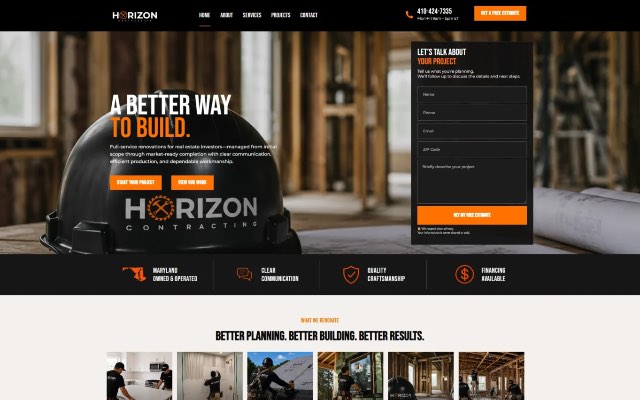
Price depends on the number of service and area pages, whether you need online booking or software integrations, and who writes the content. For reference, Blue IT’s website packages are Starter at $399 one-time (up to 5 pages, delivered in 7–10 business days) and Growth at $699 one-time (up to 10 pages plus a blog, with advanced SEO and speed optimization, in 14–18 business days), with custom pricing for larger multi-location companies. For a home-services example, see how we built a lead-focused site with a free estimate form in our
Horizon Contracting case study.
Frequently Asked Questions
How many pages does an HVAC website need?
A small company can start with a homepage, one page per core service, a maintenance plan page, an about page and a contact page, often 6 to 10 pages. Add service area pages and blog articles as you grow, but only when each page has something useful to say.
Should HVAC companies show prices on their website?
Showing a diagnostic fee, tune-up price or “starting at” price usually reduces tire-kicker calls and builds trust. Replacement prices vary too much to list exactly, so explain what affects the quote instead.
Do service area pages still work for SEO?
They can, if each one is genuinely helpful and different. Copying the same page for dozens of cities with only the name changed risks being treated as doorway pages under Google’s spam policies.
Can I still advertise the heat pump tax credit?
Not the federal 25C credit for new installs: it ended for equipment placed in service after December 31, 2025. Check current utility and state programs before advertising any rebate, and confirm details with a tax professional.
How long does it take to build an HVAC website?
A focused site can launch in a few weeks. Content (service descriptions, photos, license details and reviews) is usually what takes longest, so gather it early.
Ready for a Website That Books More HVAC Jobs?
Founded in 2015, Blue IT Technologies designs fast, mobile-first websites for local service businesses. Explore our
website design services and
local SEO services, or
contact us for a free consultation about your HVAC website.