People rarely hire a landscaper on impulse. A homeowner planning a new patio, planting beds or a full backyard often browses for weeks, saves photos, compares companies and only then asks for a consultation. Good landscaping website design is built for that slow, visual decision: it shows finished work in detail, sets honest budget expectations, proves you are licensed where it matters, and makes the consultation request feel like an easy next step.
This guide explains how to plan a landscaping or outdoor living website that brings in the right enquiries, not just more of them. It covers the portfolio, budget wording, licensing details, seasonality and the request form.
A plumber’s website has to win an urgent phone call in seconds. A landscaping website has a different job. Most visitors are not in a hurry, the projects are large and personal, and the buyer is often a couple or a family deciding together. Three things follow from that:
Most landscaping businesses sell some mix of three things. Give each one its own path from the homepage instead of putting everything on one “Services” page.
If you only do one of these, say so clearly near the top of the homepage. It saves you from leads you will turn away anyway.
A single gallery of 80 unlabeled photos looks busy and tells the visitor very little. Project pages work better because they answer the questions a buyer is quietly asking: “Have they done something like my yard? In my area? At my size?” A simple, repeatable template keeps them consistent.
| Project page element | What to include | Why it helps |
| Title | Project type and town, such as “Paver patio and fire pit, Plano” | Matches how people search and lets visitors find nearby work |
| Before and after photos | Same angle where possible, plus a few detail shots | Shows the size of the change, not just the finished result |
| Scope | Materials, square footage, plants, lighting, drainage work | Helps visitors compare it with their own plans |
| Timeline | Design time and build time | Sets expectations before the first call |
| The challenge | Slope, poor drainage, HOA approval, tight access | Shows problem solving, which photos alone cannot |
| Client comment | A real review, with the client’s permission | Adds trust next to the work it describes |
A few practical tips: use your own photos, never stock images presented as your work. Compress images so pages still load fast on a phone, since a heavy gallery is a common reason landscaping sites feel slow. And add filters by project type (patios, planting, lighting, turf) once you have more than a dozen projects.
Many landscapers avoid prices because every yard is different. That is fair, but silence has a cost: visitors who cannot tell whether you fit their budget often leave and ask a competitor. You do not need a price list. Some useful middle ground:
A budget question on the request form (more on that below) does the rest.
Licensing rules for landscape work vary a lot by state, and some apply directly to your website. Two examples:
Check your own state and city rules, then put any required license numbers in the footer and on the relevant service pages. Beyond licensing, keep claims accurate: say “drought-tolerant planting” only if you actually design for it, don’t promise a lawn will be “maintenance-free,” and use only real reviews. The FTC’s rule on fake reviews and testimonials, finalized in 2024, allows penalties for buying or inventing reviews.
This section is general information, not legal advice. Confirm current requirements with your state licensing board.
Landscaping demand moves with the weather, so the website should too. A simple yearly plan:
This does not need a redesign each season. A homepage banner and one featured section you can edit yourself is usually enough. Ask your developer to make those areas easy to change.
A blank “Message” box brings in vague enquiries you have to chase. A short, structured form gives you what you need to prioritize, while staying quick on a phone. A good landscaping form asks:
Keep it to one screen where possible, and show a clear thank-you message that says when you will reply. Then test it: submit a request from your own phone and confirm the email arrives.
Most landscaping searches are local: “landscaper near me,” “paver patio [town],” “irrigation repair [city].” A few basics help your site and your Google listing work together:
Avoid creating dozens of near-identical “landscaping in [city]” pages with only the town name swapped. Google treats that pattern as doorway pages, and it rarely helps buyers.
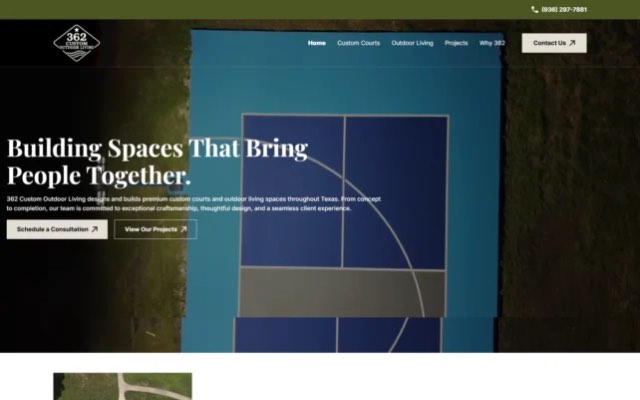
We built the website for 362 Custom Outdoor Living, a family-owned Texas company that designs and builds pickleball, basketball and tennis courts along with outdoor living spaces. Because their projects are highly visual, the site leads with large, real project photography, places consultation and project links throughout the page, and includes an interactive court designer so visitors can try colors before requesting a consultation. It also has a detailed FAQ on space, timelines, cost, surfaces and add-ons. You can read the full 362 Custom Outdoor Living case study.
Not every landscaper needs an interactive tool. The point is the same for any outdoor business: let visitors picture the result, answer their practical questions, then make the next step obvious.
The main cost drivers are the number of pages, how many project pages you want built at launch, any custom tools (like a project visualizer or online booking for maintenance) and who supplies the photos and text. For reference, our Starter package covers up to 5 pages, delivered in 5 to 7 business days. Growth covers up to 10 pages plus a blog, with advanced SEO and speed optimization, delivered in 10 to 12 business days. Custom tools and larger sites are scoped as Enterprise projects. We confirm the exact scope and price in a free consultation.
A landscaper with separate design-build, irrigation and maintenance pages, plus a portfolio and service area page, will usually need more than 5 pages. If you build outdoor structures as well, our guide to construction company website design covers extra pages that can help.
Most need a homepage, one page per main service, a portfolio with individual project pages, a process or “how we work” page, an about page, a service area page, an FAQ and a contact or consultation page.
Exact prices are rarely possible, but typical ranges, starting points and an explanation of what affects cost help buyers decide whether to contact you. For maintenance plans, simple starting prices often work well.
Enough to tell the story without slowing the page: usually a before photo, a few finished views from different angles and some close-up details. Quality and labels matter more than quantity.
It depends on your state and the type of work. California requires licensed contractors to show their license number in advertising, and Texas requires licensed irrigators to do the same. Check your state’s licensing board for current rules.
Stock photos can work for backgrounds, but never present them as your own projects. Buyers judge landscapers by their real work, and passing off stock images as yours can mislead customers.
Our website design service builds mobile-responsive, SEO-ready websites with speed, local search and conversions in mind. Blue IT has been building websites since 2015 and has more than 2,300 five-star client reviews.
When you’re ready, contact us and tell us about your landscaping business.

Talk to our team about your project. Book a free consultation, no obligation.