An electrician website has one main job: help a nervous homeowner or a busy property manager decide, within a few seconds, that you are licensed, local and able to take the job. The sites that turn searches into service calls do three things well. They sort visitors by job type (troubleshooting, upgrades, installs, commercial work), they show proof of licensing and safety before asking for anything, and they make calling or booking effortless on a phone.
This guide covers how to structure an electrical contractor’s site around the jobs you actually want, the trust signals that matter more in this trade than most, and the claims that need checking in 2026, including EV charger tax credit wording that many sites still get wrong.
Electrical work has a trust problem that other trades share less. Customers can’t judge the quality of wiring themselves, they know mistakes can cause fires, and many have heard stories about unlicensed handymen. So before price, they want reassurance: Are you licensed? Will you pull a permit? Will the work pass inspection?
The mix of jobs is also wide. One company might handle a $150 troubleshooting call, a $3,000 panel replacement, an EV charger install and a commercial tenant fit-out in the same week. A homepage that tries to speak to all of them at once usually speaks clearly to none.
Start with a simple exercise: list the four or five job types that make you the most money or that you want more of, then give each one a clear path. The table below shows a typical residential and light commercial mix.
| Job type | What the visitor wants to know | Best next step on the page |
| Troubleshooting and repairs (outlets, breakers tripping, flickering lights) | Can you come soon, what does a service call cost, are you nearby | Tap-to-call button plus a short “request service” form |
| Panel upgrades and rewiring | Do I need one, what affects the price, do you handle permits and the utility | “Request an estimate” form with a photo upload option |
| EV charger installation | Can my panel handle it, which chargers you install, rough cost range, rebates | Short pre-qualification form (vehicle, panel size, garage or driveway) |
| Generators and surge protection | Standby vs portable, sizing, maintenance, what brands you service | Estimate form or “schedule a site visit” |
| Commercial and property management work | Licensing and insurance limits, response times, invoicing, past projects | Contact form for bids, direct phone line, downloadable capability details |
If you only do residential work, say so. If you prefer commercial jobs, put that path first. Being specific filters out calls you don’t want and attracts the ones you do.
One clear line that says what you do and where, such as “Licensed residential and commercial electricians serving Plano, Frisco and McKinney.” Below it: a call button, links to your main job paths, a trust strip (license number, years in business, insurance, review rating) and a few recent reviews.
Give each main service its own page with real substance: common signs the customer needs it, what the visit or project involves, whether a permit and inspection are usually required, how pricing works (flat service fee, hourly, or quoted after inspection), and how long the job typically takes. A panel upgrade page, for example, can explain why older or undersized panels often need replacing before adding an EV charger, heat pump or major appliance.
Pages for your main cities can help with local search, but only if each one is genuinely different: local permit offices you work with, neighborhoods with older housing stock you often rewire, projects completed in that area and reviews from local customers. Copying one page and swapping the city name is the kind of doorway page Google’s spam policies warn against. Our local SEO checklist for contractors covers how to build these properly.
Most electricians mention their license in the footer. A dedicated page goes further: license type and number, where customers can verify it on the state board’s site, insurance coverage, permit and inspection policy, and any manufacturer certifications your team actually holds. This page is easy to link from estimates and emails.
Before-and-after photos of panel replacements, clean conduit runs, lighting installs and commercial work show quality in a way words can’t. Add a sentence or two to each project: the problem, what you did and the location (city level is enough).
Real team photos, how long you’ve been in business and why you started. Keep the contact form short: name, phone, ZIP code, job type and a free-text box. An optional photo upload is especially useful for electrical work, since a picture of a panel label or a damaged outlet helps you quote faster.
This is the area where electrician websites most often fall short, and it carries real risk. Rules vary by state, so treat the examples below as general information, not legal advice, and check your own state licensing board.
The practical fix is simple: put your license number in the site header or footer so it appears on every page, repeat it on the licensing page and on landing pages used for ads, and make sure the business name on the site matches the name on the license. If you work in several states, list each license.
People search “burning smell from outlet” or “breaker hot to the touch” in a panic. A short, calm safety box on your repair and emergency pages helps them and shows you take safety seriously. For example: if you see smoke, flames or sparking, leave the area and call 911; if a power line is down or there is a utility-side problem, call your utility; for everything else, call us. Only promise emergency or 24/7 service if you actually answer the phone at those hours. “Same-day service most weekdays” is better than a 24/7 claim that goes to voicemail.
Electrical websites often carry incentive and code wording written years ago. The points below are general information, not tax or legal advice; confirm details with a tax professional, your utility or your local authority.
Many EV charger pages still say customers can “get 30% back” through the federal Section 30C credit. The 2025 federal budget law (often called the One Big Beautiful Bill Act) moved that credit’s end date from 2032 to June 30, 2026, and published guides agree it applies only to chargers placed in service by that date. For home chargers it was capped at $1,000 and limited to eligible locations. If your page still promotes it for new installs, update it. Utility and state rebates may still exist, so link to your utility’s program instead of quoting amounts that change.
The 2026 edition of the National Electrical Code (NFPA 70) was approved in September 2025, but adoption is uneven. State documents show Massachusetts, Maine and Oregon adopting it in 2026, while many jurisdictions still enforce the 2020 or 2023 edition. Rather than claiming you install “to the latest code,” say that you follow the code adopted by the local authority and pull permits where required.
Show only real reviews, never write or buy them, and don’t use badges you haven’t earned. The FTC’s rule on fake reviews and testimonials, in effect since October 2024, allows civil penalties for fake or misleading reviews. If you run Google Local Services Ads, the badge you display must match your current verification status; Google’s help pages list state business and owner license checks, insurance and background checks for the electrician category.
Your website and Google Business Profile should tell the same story: same business name, phone, service area and hours. Our Google Business Profile guide walks through that side.
Costs depend mostly on the number of pages, custom features and who writes the content. As a reference point, our Starter package covers up to 5 pages, delivered in 5 to 7 business days. Growth covers up to 10 pages plus a blog, with advanced SEO and speed optimization, in 10 to 12 business days. Larger multi-location or commercial sites are scoped as Enterprise projects. We confirm the exact scope and price in a free consultation.
A contractor with separate pages for repairs, panel upgrades, EV chargers, generators and commercial work, plus licensing and projects pages, usually needs more than 5 pages, so plan your page list before comparing quotes. If you work in several trades, our HVAC website design guide covers a similar structure for heating and cooling.
In many states, yes. Texas, California and Florida all require the license or certification number in advertising, and a business website is generally treated as advertising. Check your state board’s rules, and when in doubt, show it on every page.
You don’t need a full price list, but a published service call fee or typical ranges for common jobs helps visitors decide. Add a note that the final price depends on an on-site inspection.
Most local electrical contractors need a homepage, a page for each main service, a licensing and safety page, projects, about, reviews and contact. That is often 10 to 15 pages, plus service area pages if you cover several cities.
Not for new installations. The Section 30C credit covers only chargers placed in service by June 30, 2026. Customers who installed before then may still claim it on their 2026 tax return, so word any mention carefully and suggest they ask a tax professional.
They can, if each page offers useful local detail such as real projects, local reviews and permit information. Near-duplicate pages with only the city name changed can hurt your site.
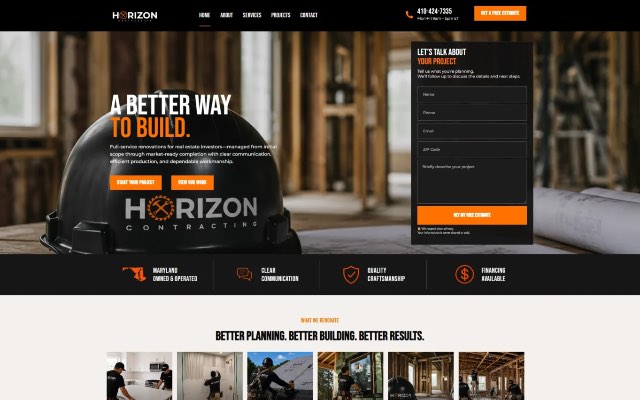
Our website design service delivers mobile-responsive, SEO-ready builds with speed in mind and structured to support conversions. Blue IT has been building websites since 2015, and you can see contractor work such as Horizon Contracting in our case studies.
When you’re ready to plan your new site, contact us and tell us about your electrical business.

Talk to our team about your project. Book a free consultation, no obligation.