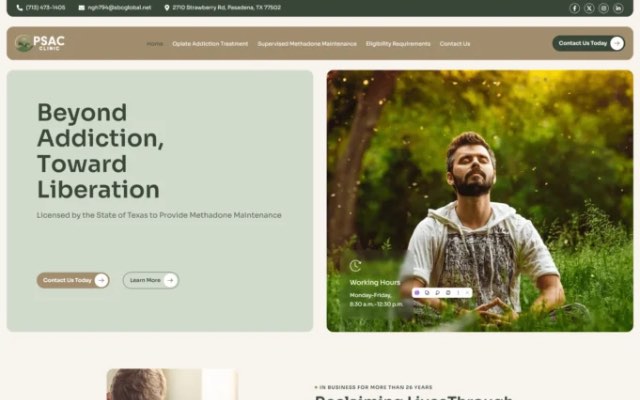
For most new patients, your website is the first impression of your practice. Before they call, they check whether you accept their insurance, whether your providers look experienced and approachable, how easy it is to book, and what other patients say. A medical practice website that answers those questions quickly turns searches into appointments.
This guide covers the pages and features every clinic or practice website needs in 2026, the privacy and accessibility points to get right, and how to make your site easy to find in local search.
Key Takeaways
- Make booking the easiest action on every page: online scheduling, a click-to-call number and clear office hours.
- Show who patients will see: provider bios with credentials, specialties and real photos.
- Publish the practical details patients look for: insurance accepted, location, parking and what to bring.
- Don’t collect health information through ordinary contact forms; use HIPAA-appropriate tools for anything that includes patient health details.
- Design for accessibility from the start. It helps every patient and reduces legal risk.
Pages Every Medical Practice Website Needs
Homepage
State what kind of care you provide, where, and how to book, all above the fold. Add your phone number, a “Book an Appointment” button, your address and whether you’re accepting new patients.
Services or conditions treated
Give each major service its own page: what it is, who it’s for, what to expect at the visit, preparation, recovery and frequently asked questions. These pages answer patient questions and are what people find through search.
Providers
A page per provider with their photo, credentials, board certifications, specialties, languages spoken and a short, human introduction. Patients choose people, not just practices.
Insurance and billing
List the insurance plans you accept, self-pay options and how billing works. This is one of the most-visited pages on practice websites and a common reason patients call.
New patient information
What to bring, how to complete intake forms, arrival time, cancellation policy and directions with parking information.
Locations and hours
A page for each location with an embedded map, hours, phone number and accessibility details such as wheelchair access and elevators.
Reviews and patient stories
Feature reviews from Google and other platforms. Only publish patient stories with written authorization, and never reveal health details without consent.
Contact and appointment request
A simple way to reach you that doesn’t ask for medical details (see the privacy section below).
Features That Increase Appointments
- Online scheduling integrated with your practice management system, or a clear booking request flow if real-time scheduling isn’t possible.
- Click-to-call and, where appropriate, click-to-text on mobile.
- Telehealth information if you offer virtual visits, including how to join.
- Patient portal link in the header for existing patients.
- “Accepting new patients” status shown clearly.
- Fast, mobile-friendly pages, because many patients search on their phones.
- Multilingual content if you serve communities that prefer another language.
Privacy and HIPAA: What Your Website Should and Shouldn’t Do
This section is general guidance, not legal advice. Review your setup with your compliance officer or legal advisor.
- Keep health details out of standard contact forms. A regular website form usually sends submissions by plain email and stores them in tools that aren’t designed for protected health information. Ask only for name, contact details and preferred time, and direct patients to your portal or a HIPAA-compliant form for anything clinical.
- Use vendors who will sign a Business Associate Agreement (BAA) for any tool that handles patient health information, such as secure forms, scheduling or chat.
- Be careful with tracking technologies. Analytics and advertising pixels on pages where patients log in, book or describe symptoms can raise HIPAA concerns. The US Department of Health and Human Services has published guidance on online tracking technologies; review it with your advisor before adding pixels.
- Use HTTPS on every page and keep the website software updated.
- Publish a clear privacy policy and, if required, your Notice of Privacy Practices.
Accessibility: Design for Every Patient
Patients with visual, hearing, motor or cognitive disabilities need to be able to use your website. The Web Content Accessibility Guidelines (WCAG) 2.1 at level AA are the standard most commonly used to measure accessibility. Practical steps include:
- Sufficient color contrast and readable font sizes.
- Descriptive alt text for images.
- Full keyboard navigation and visible focus states.
- Clear labels on every form field.
- Captions for videos and transcripts for audio.
- Headings in a logical order so screen readers can navigate the page.
Content Patients and Google Can Trust
Health information affects people’s wellbeing, so Google holds it to a high standard of expertise and trustworthiness. Strengthen your content by:
- Having clinical content written or reviewed by a qualified provider, and showing the reviewer’s name and credentials.
- Dating your articles and updating them when guidance changes.
- Linking to authoritative sources where appropriate.
- Avoiding exaggerated claims or guarantees about outcomes.
Local SEO for Medical Practices
- Google Business Profile: complete a profile for each location, with accurate categories, hours, photos and appointment links. Individual providers may also qualify for their own profiles, following Google’s guidelines.
- Consistent details across your website, insurance directories, health directories such as Healthgrades and Zocdoc, and maps.
- Location and service pages that clearly describe the care you provide in each area.
- Reviews: ask satisfied patients for reviews, and reply without confirming that the reviewer is a patient or mentioning any health details.
For a deeper checklist, see our guide to local SEO; most of the same principles apply to clinics.
Common Mistakes on Practice Websites
- No online booking, or a booking button hidden at the bottom of the page.
- Outdated provider lists and office hours.
- Insurance information missing or out of date.
- Contact forms asking patients to describe symptoms.
- Stock photos instead of your real team and office.
- Small text and low contrast that are hard to read.
Healthcare Websites We’ve Designed
Our team has designed websites for healthcare and wellness organizations including Pasadena Clinic, Maryland Health Foundation, Mark Zaegel Counseling and Kim Klunzinger Nutrition. See more in our portfolio.
Frequently Asked Questions
Does a medical practice website need to be HIPAA compliant?
Any part of your website that collects, stores or transmits protected health information must be handled in a HIPAA-compliant way, with vendors that sign a BAA. Informational pages that don’t collect health information are not a HIPAA issue in themselves, but tracking tools on sensitive pages need care.
Can patients book appointments directly on our website?
Yes. Most practice management and scheduling systems offer online booking that can be embedded or linked from your site.
How much does a medical practice website cost?
It depends on the number of locations, providers and services, and on integrations such as scheduling and patient portals. See our WordPress website cost guide for typical ranges, or ask us for a quote.
Should we have a blog?
Educational articles reviewed by your providers can answer common patient questions and help you appear in search, as long as they’re accurate and kept up to date.
Ready to Turn Searches Into Appointments?
We design fast, accessible websites for practices and clinics, with clear booking paths and content patients can trust. Explore our website design services or book a free consultation.